
HRMS feature
Attendance management software with shifts, punches, and team visibility
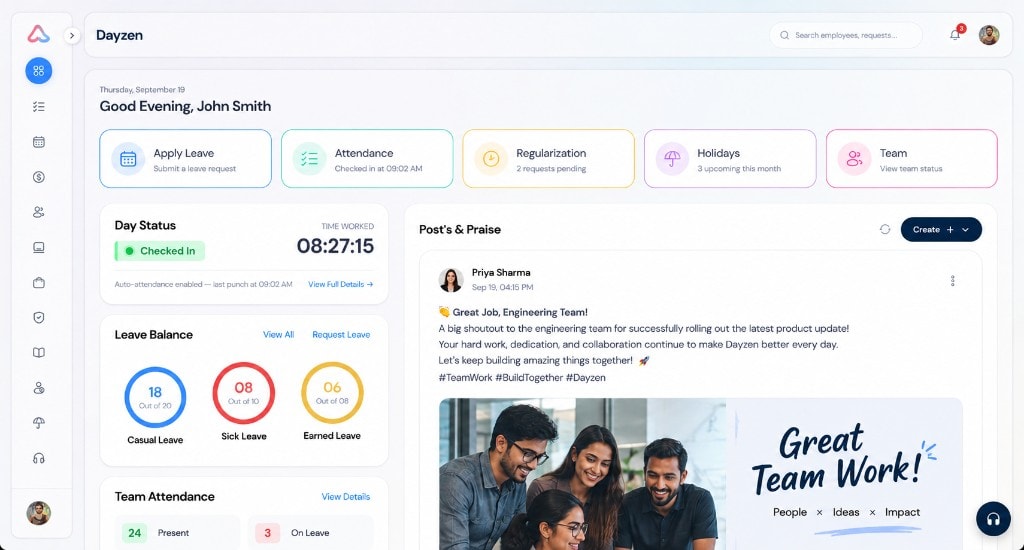
Capture check-in/out with policy-aware shifts, GPS/IP verification, regularization, and supervisor views — then carry approved attendance into payroll LOP sync.
What is attendance management software?
Who this helps
- HR teams reconciling multi-location punches
- Managers who need a clear team presence view
- Organizations that sync attendance into payroll LOP
One timeline
The Monday problem Dayzen attendance solves
How Dayzen captures and governs attendance
Employees punch with geofenced GPS and IP verification. Shift tickers track worked time. Partial-day leave coverage maps approved leave against shift hours. Session timelines can show intervals and location context for review.
- Employee punch check-in/out with GPS and IP verification
- Shift timings, grace periods, lunch/tea windows, and policy timezones
- Dynamic weekend definitions for non-standard schedules
- Monthly attendance calendar grid and log breakdowns
- Regularization requests and approval queues with credit limits
- Team attendance matrix for supervisors
- Auto-absent and auto-punch-out background jobs
- Optional face verification enrollment and punch matching
Shift rules
Policies before punches
Payroll handoff
From day punch to payroll input
- Employee checks in/out under the active shift policy.
- Missed punches can be regularized and approved.
- Logs and calendars give HR and managers a month view.
- Payroll generation syncs attendance and LOP into the pay run.
Optional verification
Face verification (optional)
- Tokenized enrollment portal
- Live camera matching on punch
- Liveness challenges such as blink, head turn, and smile
Related reading
How approved attendance becomes pay inputs — and how attendance systems work conceptually.
Keep exploring
Related HR workflows
Attendance connects time on the floor with leave coverage and payroll LOP inside Dayzen HRMS.
Leave management
Policies, balances, approvals, and sandwich rules.
Explore Leave managementPayroll
Attendance sync, statutory calc, and payslips.
Explore PayrollEmployee management
People directory and org structure.
Explore Employee managementHRMS overview
See the full hire-to-exit module set.
Explore HRMS overviewFAQ
What is attendance management software?
Attendance management software records when employees start and end work, applies shift and policy rules, and gives managers visibility into presence — often feeding approved time into payroll.
How do employees punch in Dayzen?
Employees check in and out from Dayzen attendance. Punches can be verified with GPS and IP checks, and organizations can enable optional face verification matching against enrolled face data.
Can attendance policies differ by shift or timezone?
Yes. Attendance policies support shift start/end, grace periods, break windows, configurable weekend definitions, and evaluation in an explicit policy timezone for multi-region teams.
What is attendance regularization?
Regularization is the request-and-approval flow for correcting missed or incorrect punches. Dayzen includes employee requests and manager/HR approval queues, with optional monthly regularization credit limits.
Can managers see team attendance?
Yes. Supervisors get a team attendance matrix with filters such as Present, Late, Absent, On Leave, On Holiday, and On Weekend, plus per-employee attendance detail views.
Does attendance affect payroll?
Yes. Dayzen payroll generation syncs attendance and loss-of-pay (LOP) inputs as part of the payroll run workflow.
Does Dayzen support face verification?
Yes, as an optional capability: tokenized face enrollment, live camera matching on punch, management views, retention jobs for expired photos, and liveness challenges such as blink, head turn, and smile.
Prefer a walkthrough? Book a demo.
Walk through Dayzen attendance with your shift rules.
Bring your grace periods, weekend definitions, and regularization policies — we will map them to Dayzen attendance workflows.